
Contents
- 01What is CI/CD?
- 02CI/CD Meaning: Breaking It Down
- Continuous Integration (CI)
- Continuous Delivery (CD)
- Continuous Deployment
- 06Why Do Developers Need CI/CD?
- 07What is a CI/CD Pipeline?
- 08The CI/CD Process Step by Step
- Step 1 — Code Commit
- Step 2 — Automated Build
- Step 3 — Automated Testing
- Step 4 — Code Review and Quality Checks
- Step 5 — Staging Deployment
- Step 6 — Production Deployment
- 15Benefits of CI/CD in DevOps
- 16Popular CI/CD Tools
- 17Best Practices for CI/CD
- 1. Commit Code Frequently
- 2. Fix Broken Builds Immediately
- 3. Keep Tests Fast
- 4. Maintain a Single Source of Truth
- 5. Test in Production-Like Environments
- 6. Monitor Everything
- 7. Automate Security Testing
- 25Conclusion
If you have ever worked with software developers, you have probably heard the terms CI/CD thrown around. Maybe in a meeting. Maybe in a job description. Maybe on a technical blog you stumbled across.
But what does CI/CD actually mean? And why do so many development teams treat it as non-negotiable?
This guide answers those questions clearly and without unnecessary jargon. Whether you are a developer, a business owner, a project manager, or just someone trying to understand modern software development better — this is the place to start.
What is CI/CD?
CI/CD stands for Continuous Integration and Continuous Delivery (or Continuous Deployment). It is a set of practices and automated processes that help software development teams deliver code changes more frequently, more reliably, and with far fewer problems.
In simple terms, CI/CD is the system that takes code written by developers and — automatically — tests it, checks it, and gets it ready to go live. Instead of releasing software in large, infrequent batches (which is risky and stressful), CI/CD enables teams to release small changes regularly and confidently.
Simple definition: CI/CD is the automated bridge between writing code and getting it live — making software delivery faster, safer, and more consistent.
CI/CD is a core part of the DevOps philosophy, which brings development and operations teams together to build, test, and release software more efficiently. Without CI/CD, DevOps is just a concept. With it, DevOps becomes a reality.
CI/CD Meaning: Breaking It Down
Let us look at each part of CI/CD separately, because they solve slightly different problems.
Continuous Integration (CI)
Continuous Integration is the practice of developers merging their code changes into a shared repository — often multiple times a day. Each time code is merged, an automated system kicks in to build and test the changes.
Before CI, developers would work in isolation for days or weeks, then attempt to merge their work all at once. The result was often a painful, time-consuming process of fixing conflicts and chasing bugs — sometimes called "integration hell."
CI solves this by making integration a constant, automated habit. Problems are caught early, when they are small and easy to fix, rather than late, when they have multiplied and hardened.
Key CI activities include: automated builds, unit tests, integration tests, static code analysis, and immediate feedback to developers when something breaks.
Continuous Delivery (CD)
Continuous Delivery extends CI by automatically preparing code for release to a production-like environment after it has passed all tests. The key point: with continuous delivery, deploying to production is a decision made by humans — but the code is always ready to go.
Think of it like a well-stocked airport gate. The plane (your code) is fuelled, checked, and boarded. The pilot (your team) just needs to decide when to push back from the gate.
Continuous Deployment
Continuous Deployment takes things one step further — every change that passes all tests is automatically deployed to production without human intervention. There is no manual "release" decision. Companies like Amazon, Netflix, and Facebook deploy code hundreds or thousands of times per day using continuous deployment.
Not every organisation needs full continuous deployment. Many teams use continuous delivery — keeping humans in the loop for the final release decision — which offers a good balance of speed and control.
Why Do Developers Need CI/CD?
This is a fair question. Software was built for decades without CI/CD. So why has it become so important?
The answer comes down to speed, scale, and quality — and how dramatically the demands on software teams have changed.
Modern software is complex. Applications have hundreds of components, thousands of lines of code, and teams of developers often spread across multiple time zones working simultaneously. Coordinating all of that manually is a recipe for errors, delays, and burnout.
Here is what life without CI/CD looks like:
- Developers work in separate branches for days or weeks without feedback
- Merging code becomes a nightmare of conflicts and broken functionality
- Testing is manual, inconsistent, and happens late in the process
- Releases are rare, high-stakes events that everyone dreads
- When something goes wrong in production, it is hard to identify the cause
And here is what CI/CD enables:
- Code is integrated and tested multiple times a day — problems surface immediately
- Every change is automatically validated before it can cause damage
- Releases become routine, low-risk events rather than stressful milestones
- Teams move faster because they spend less time debugging and fixing
- Developers get rapid feedback and can iterate quickly
CI/CD is not just a technical nicety — it is a competitive advantage. Businesses that ship software faster and more reliably serve their customers better.
What is a CI/CD Pipeline?
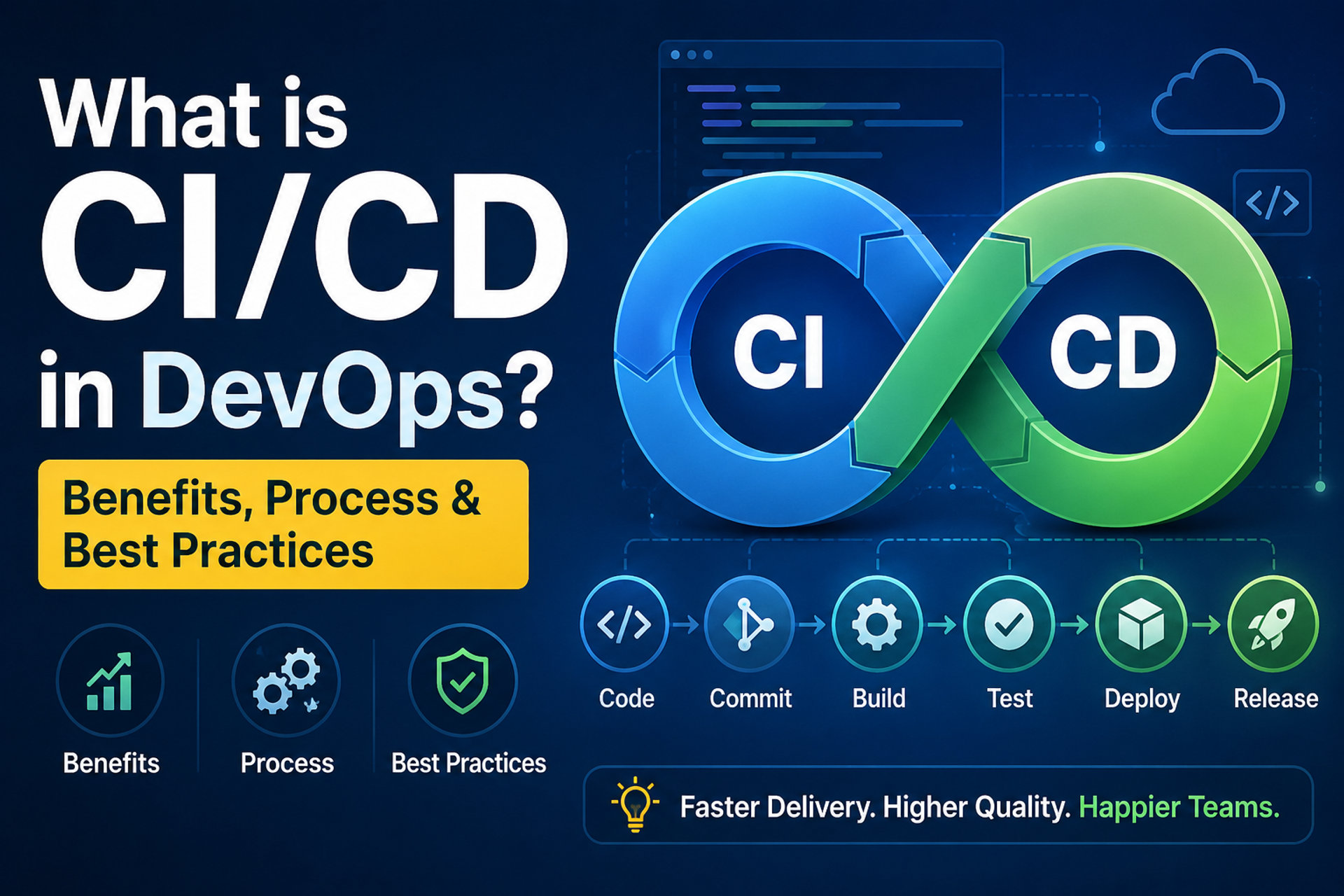
A CI/CD pipeline is the automated sequence of steps that your code goes through from the moment a developer commits a change to the moment it reaches users.
Think of it like a production line in a factory. Raw materials (your code changes) go in one end. They pass through a series of quality checks, assembly stages, and inspections. What comes out the other end is a finished, tested, ready-to-ship product.
The pipeline is the heart of CI/CD. It is what makes the whole system automatic, consistent, and reliable. Without a well-designed pipeline, CI/CD is just a wish.
The CI/CD Process Step by Step
Here is how a typical CI/CD pipeline works, from start to finish:
Step 1 — Code Commit
A developer writes code and commits it to a version control system — typically Git. This simple action triggers the entire CI/CD pipeline automatically.
Step 2 — Automated Build
The CI system pulls the latest code and attempts to build it — compiling the code, resolving dependencies, and creating a runnable version of the application. If the build fails, the developer is immediately notified.
Step 3 — Automated Testing
This is where the heavy lifting happens. A suite of automated tests runs against the new code:
- Unit tests: Test individual functions and components in isolation
- Integration tests: Test how different components work together
- Regression tests: Ensure existing features still work correctly after the new change
- Security scans: Automatically check for known vulnerabilities in the code
If any test fails, the pipeline stops and the developer is alerted. The broken code never progresses further.
Step 4 — Code Review and Quality Checks
Automated tools check the code for style issues, complexity, duplication, and other quality metrics. Some pipelines also require a human code review before code can proceed — adding a layer of expert oversight on top of the automation.
Step 5 — Staging Deployment
Code that has passed all tests is automatically deployed to a staging environment — a close replica of production. This is where more thorough testing can happen, including performance testing and user acceptance testing.
Step 6 — Production Deployment
With continuous delivery, the team reviews the staging results and makes the decision to deploy. With continuous deployment, this step also happens automatically if all checks pass. Either way, the deployment is consistent, repeatable, and much safer than a manual process.
Benefits of CI/CD in DevOps
CI/CD is not just about making developers' lives easier — though it definitely does that. It delivers measurable business benefits:
- Faster time to market: Smaller, frequent releases mean new features and fixes reach users much faster. Teams that practice CI/CD can deploy multiple times per day rather than once a month.
- Fewer bugs in production: Automated testing catches issues early, before they reach real users. The earlier a bug is caught, the cheaper and easier it is to fix.
- Reduced deployment risk: Small, frequent changes are easier to understand, test, and roll back if something goes wrong. Large, infrequent releases are where the big, expensive failures happen.
- Higher developer productivity: Developers spend less time on manual tasks, debugging integration issues, and waiting for releases. They spend more time building things.
- Better code quality: The constant discipline of automated testing encourages developers to write cleaner, more testable code.
- Faster feedback loops: Developers learn within minutes whether their change works — not days or weeks later during a release cycle.
- Greater confidence: Teams know that every change has been automatically validated. Releases go from stressful events to routine operations.
Popular CI/CD Tools
There are many excellent CI/CD tools available today. The right choice depends on your team size, existing infrastructure, and specific needs. Here is an overview of the most widely used:
| Tool | Primary Purpose | Best For |
|---|---|---|
| Jenkins | Open-source automation server | Highly customisable pipelines |
| GitHub Actions | CI/CD built into GitHub | GitHub-hosted projects |
| GitLab CI/CD | Fully integrated DevOps platform | End-to-end DevOps in one tool |
| CircleCI | Cloud-native CI/CD | Fast cloud builds |
| Travis CI | Hosted CI service | Open-source projects |
| Azure DevOps | Microsoft's all-in-one DevOps suite | Microsoft/Azure ecosystems |
| ArgoCD | GitOps continuous delivery for K8s | Kubernetes deployments |
Choosing the right CI/CD tool for your team can be complex. GroveTechs's technology services include expert guidance on tooling selection, pipeline design, and full CI/CD implementation — so you get the right setup from day one.
Best Practices for CI/CD
Implementing CI/CD is one thing. Getting the most out of it is another. Here are the practices that separate high-performing CI/CD pipelines from mediocre ones:
1. Commit Code Frequently
The whole point of CI is to integrate continuously. Developers should commit small, focused changes multiple times a day — not large batches at the end of a week. Smaller commits are easier to test, easier to review, and easier to roll back if needed.
2. Fix Broken Builds Immediately
When the pipeline fails, it must be treated as the top priority. A broken build blocks the entire team. Establish a culture where a failing pipeline is never ignored or worked around — it is always fixed immediately.
3. Keep Tests Fast
If the test suite takes 40 minutes to run, developers will avoid triggering it. Aim to run the most critical tests quickly — under 10 minutes where possible — and schedule longer, slower tests to run in parallel or at scheduled intervals.
4. Maintain a Single Source of Truth
All configuration, infrastructure definitions, and deployment scripts should live in version control alongside the application code. This approach — known as Infrastructure as Code — ensures that your environment is always reproducible and your pipeline is always consistent.
5. Test in Production-Like Environments
Your staging environment should mirror production as closely as possible. If they are different, the tests you run in staging will not accurately predict what will happen in production — defeating the purpose.
6. Monitor Everything
CI/CD does not end at deployment. Monitor your application in production to catch issues that testing might have missed. Use alerting so your team knows immediately when something goes wrong after a release.
7. Automate Security Testing
Build security checks into the pipeline from the start — not as an afterthought. Automated security scanning at every stage catches vulnerabilities early, before they reach production and before fixing them becomes expensive.
Transform Your Business
Ready to Build a CI/CD Pipeline That Works?
GroveTechs specialises in DevOps, CI/CD implementation, cloud infrastructure, and software development. Whether you are starting from scratch or optimising an existing pipeline, our team has the hands-on expertise to deliver results. Contact us today for a free consultation.
Contact Grovetchs Today and Start Your AI Journey!Conclusion
CI/CD has moved from a cutting-edge practice to a fundamental expectation in modern software development. Teams that embrace it ship faster, break fewer things, and sleep better at night. Teams that ignore it struggle with slow releases, unpredictable quality, and developers who spend more time firefighting than building.
The good news is that CI/CD is not just for large enterprises with massive engineering teams. With the right tools and approach, teams of any size can implement CI/CD and start reaping the benefits.
GroveTechs is here to guide you from where you are today to a fully automated, high-performance delivery pipeline — so your team can focus on what they do best: building great software.
Frequently Asked Questions
Common questions about Best CI CD Tools for DevOps in 2026 | Complete Guide
CI/CD stands for Continuous Integration and Continuous Delivery (or Continuous Deployment). Continuous Integration is the practice of frequently merging and automatically testing code changes. Continuous Delivery ensures the code is always ready to be deployed. Continuous Deployment goes one step further and automatically deploys every change that passes testing.
Continuous Delivery means your code is always ready to deploy, but a human makes the final decision to release it. Continuous Deployment means every change that passes tests is automatically deployed to production with no human intervention required. Most teams start with continuous delivery and move toward continuous deployment as their confidence in their pipeline grows.
Absolutely. CI/CD is not just for large organisations. Even a two-person development team benefits from automated testing, consistent builds, and reliable deployments. The earlier you establish good CI/CD practices, the easier it is to maintain them as your team and codebase grow.
There is no single best tool — it depends on your team's needs, existing infrastructure, and preferences. GitHub Actions is popular for teams already using GitHub. GitLab CI/CD is excellent if you want everything in one platform. Jenkins offers the most flexibility for complex custom pipelines. Azure DevOps suits Microsoft-stack teams.
The timeline varies depending on the size of your team, the complexity of your application, and how much automation is already in place. A basic CI/CD pipeline for a small project can be set up in days. A full enterprise implementation with comprehensive testing and multiple environments takes longer.
Prayag B
Frontend Architect · GroveTech Solutions
Prayag is a frontend architect at GroveTech Solutions with deep expertise in React, Next.js, and modern JavaScript frameworks. He helps engineering teams make informed technology decisions.